Remove a printer in print management
1. Press the Win+R keys to open Run, type printmanagement.msc into Run, and click/tap on OK to open Print Management.
2. Expand open Print Servers, expand open your local print server (ex: "Brink-Desktop") for this PC, and open Printers in the left pane of Print Management. (see screenshot below)
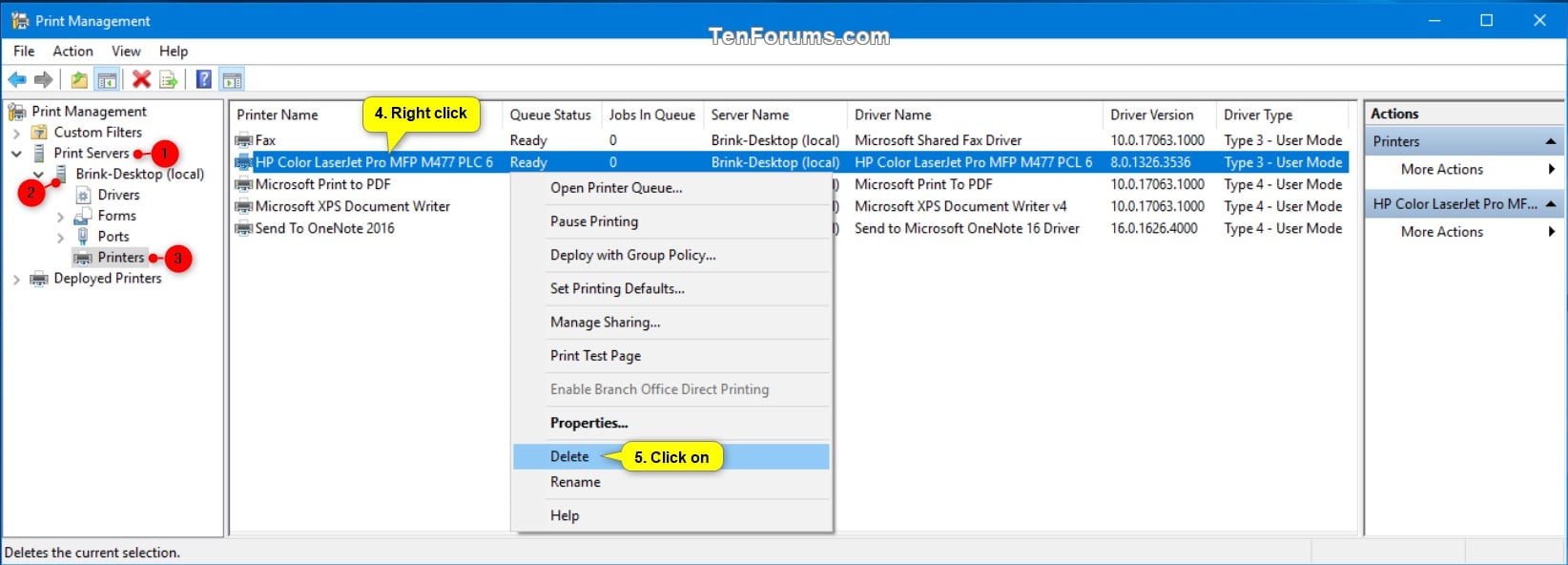
3. Right click or press and hold on the printer (ex: "HP Color LaserJet Pro MFP M477 PCL 6") you want to remove in the middle pane of Print Management, and click/tap on Delete. (see screenshot above)
4. Click/tap on Yes to confirm. (see screenshot below)

5. You can now close Print Management if you like.
Related Articles
How to add printer to PC
1. Go to Control Panel > Hardware & Sound 2. Once in settings > Devices and Printers 3. Click on Add Printer > This printer wasn't listed 4. Click on Add printer using IP/TCP address 5. Once one the page, type in the IP address of printer. This can ...Accessing Printer Press" Freezes Excel and Powerpoint
Whenever I make any formatting change in Excel and Powerpoint the program freezes and "Accessing Printer Press" appears in the lower left hand corner. This can last for minutes, and is extremely frustrating when I'm trying to re-size columns and rows ...Setting up Scan to Email
1. Go to your WBI [Web browser interface homepage] [Note: To do that type in your IP address of the printer in the URL] 2. Navigate to the setting page 3. Log in to as Admin [If you have set an admin account password] 4. Click Services Settings 5. ...Setup Bitlocker Encryption on Windows 10 without TPM
1. From the Metro UI or the search box, type GPEDIT.MSC and press enter 2. Open Computer Configuration => Administrative Templates => Windows Components => BitLocker Drive Encryption => Operating System Drives. From the right pane double-click ...Understanding how routers and switches work
At the most basic level a router links two networks together, the network within your home (however big or small) and the network outside your home (in this case, the Internet). The broadband modem provided to you by your ISP is only suited to ...